Managing EXIF Orientation and Camera Groups in Photogrammetry
Inspect stored pixels, orientation tags, image dimensions, and calibration groups before processing mixed imagery or transferring masks and camera parameters.
Distinguish stored pixels from displayed orientation
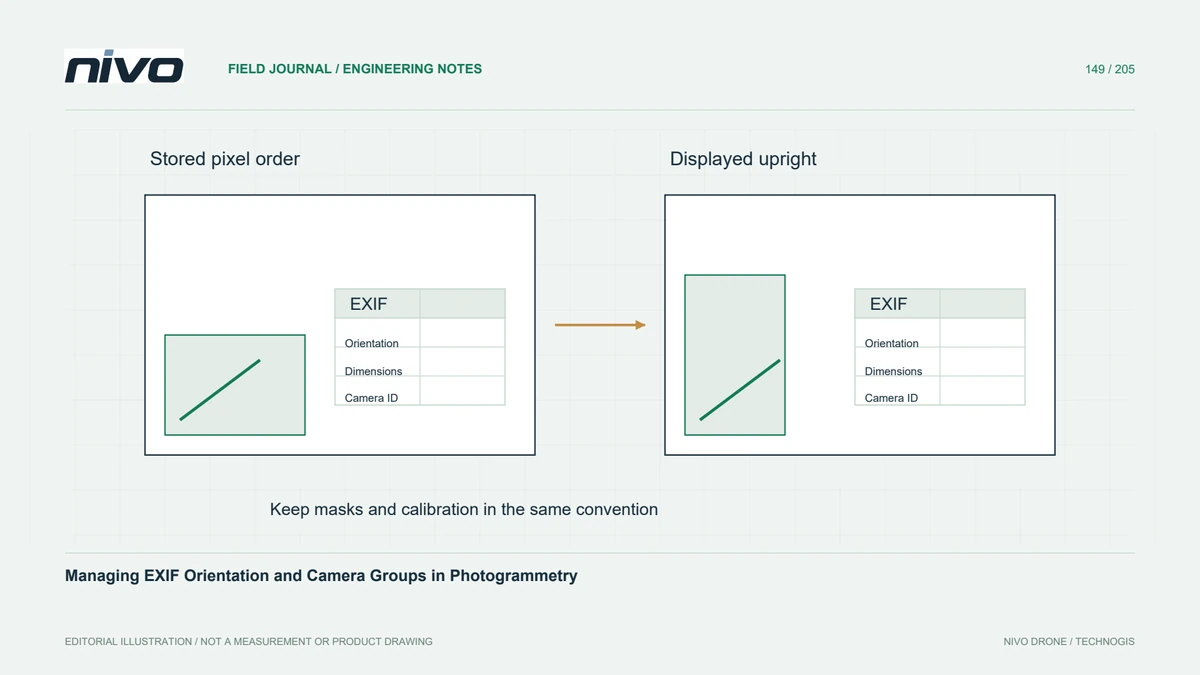
An image viewer can rotate a photograph for display using its EXIF orientation tag without changing the stored pixel arrangement. Another tool may physically rotate pixels and rewrite or remove the tag. These cases are not equivalent when masks, image coordinates, or calibration parameters are reused. Establish how the processing software interprets orientation before making manual rotations that may apply the same correction twice.
Inventory the actual image files
Create an inventory of filenames, stored dimensions, orientation tags, camera identifiers, focal information, and preprocessing history. Compare originals with any edited exports. A batch that appears visually consistent can contain resized, cropped, or geometrically corrected images. Flag unexpected changes and identify their source rather than assuming every photograph from the same camera model belongs to one unchanged geometric configuration.
Group calibration from physical evidence
Shared calibration should reflect a defensible common imaging setup, not merely a convenient folder name. Separate physical cameras or changed lens settings where the workflow requires it, while avoiding unjustified fragmentation into many weak groups. Check how the software constructs its camera identifiers from metadata. Missing or altered tags can cause accidental grouping that is not apparent from the displayed photograph.
Keep masks and coordinates aligned
Masks and manually marked observations must use the coordinate convention expected at the stage where they are read. A mask drawn on an upright preview may need different handling from one created on raw pixel order. Confirm dimensions and alignment in the actual application. Likewise, do not transfer principal-point coordinates after resizing or rotating pixels without the appropriate geometric conversion and verification.
Test a mixed-orientation subset
In a hypothetical survey containing landscape and portrait images from two setups, process a small representative subset first. Inspect extracted camera groups, image orientations, mask overlays, and the resulting camera network. Include one file that passed through an editing application. Correct the metadata or grouping policy at the source of the problem, then repeat the subset before spending time on the complete reconstruction.
Preserve the metadata trail
Retain immutable originals, an image manifest, documented metadata overrides, and the selected grouping policy. Record any physical pixel transformation and regenerate dependent observations or masks when necessary. Acceptance should establish that every image is interpreted consistently and calibration is applied to the intended files. Successful registration alone does not prove that orientation handling and camera grouping were geometrically correct.